
Trustpilot is a website used by people to look up a business or a company for reviews about the products or services they provide. Lots of business owners use it to collect genuine feedback and show off all the love that they’re getting from their customers.
But so many businesses also ignore the benefit of displaying the Trustpilot reviews on their website or using them for marketing. Why even collect it in the first place, then? Are they not using it because they don’t know how to?
Add Trustpilot Reviews on Your Website Using Feedspace
You can easily import and embed Trustpilot reviews using Feedspace a tool that magically imports content at the tap of a button, and it comes with other features like
- Being able to collect new reviews and feedback in video, audio, and text.
- Having API access to integrate Feedspace with different applications.
- Embed a supported Wall Of Love that can be changed to match the design of any website.
Import Trustpilot Reviews into Feedspace
Importing Trustpilot reviews with Feedspace takes just three steps.
Step 1: Create A Feedspace Account
Either make a new account with Feedspace or sign in to an existing one.

Step 2: Begin to Import Trustpilot Reviews
From the Feedspace dashboard, click Import in the left sidebar. Keep Automated Import selected.
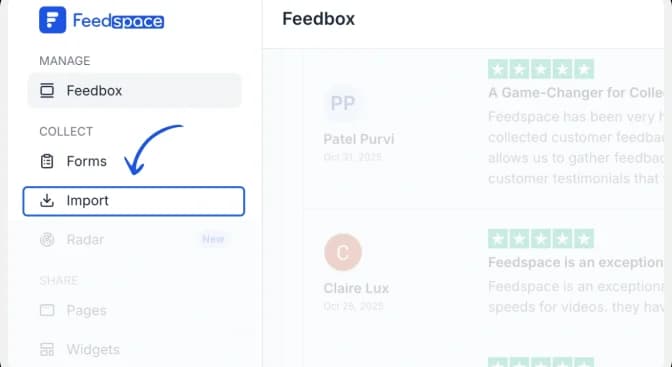
Step 3: Paste the Trustpilot URL and fetch reviews
Paste the Trustpilot restaurant URL into the Search Business or Enter your URL field. Click Fetch Reviews and wait for Feedspace to retrieve the public reviews from the restaurant listing.
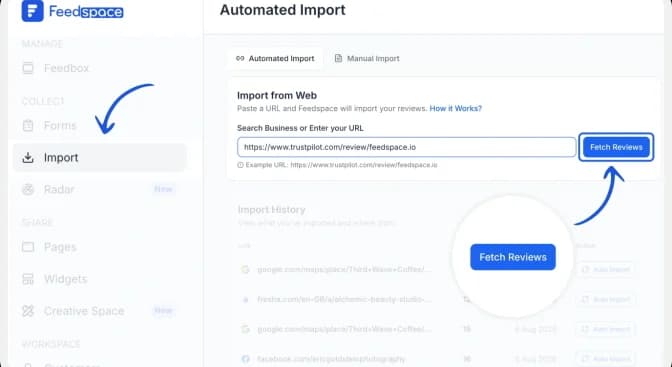
Step 4: Import the Trustpilot reviews
After Feedspace fetches the reviews, click Import Review to add them to your Feedspace account.

Step 5: Start Building A Wall Of Love

Once the import is complete, click Create Wall of Love Page. You can also open Pages from the sidebar and click Create Page.
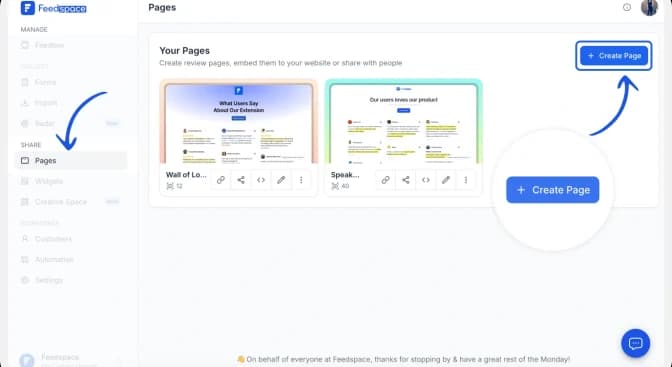
Step 6: Select Trustpilot Reviews to Display
Choose the imported Trustpilot reviews you want to show. Use Select All to include every review or select individual reviews manually. You can change their order or use automated selection, then click Save & Next.
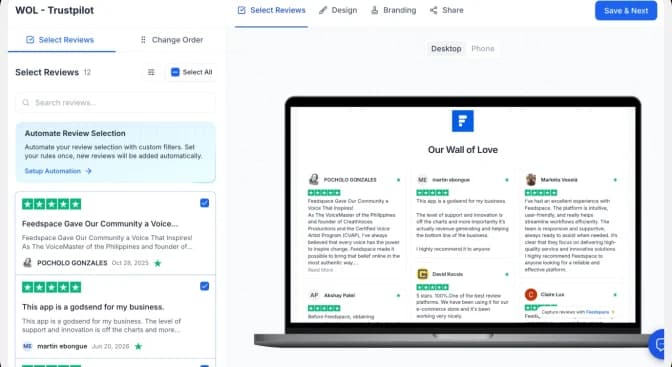
Step 7: Customize Your Wall Of Love
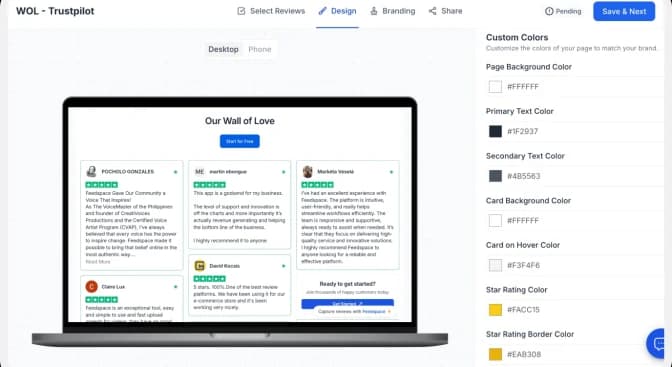
Use the Design tab to adjust the page background, text, review cards and link colours. Check the desktop and mobile previews as you work. Use the Branding tab to update the page title, description, logo and other brand details, then click Save & Next.
| Conversion tip: Match the Wall of Love to your website, keep the review cards easy to scan, and use a specific CTA such as “Start free trial” or “Book a demo” instead of a generic “Learn more.” |
Step 8: Save And Share!
Congrats! You’ve built your Trustpilot Wall Of Love!
Make sure you share your newly created Wall Of Love with everyone! Just copy the provided link.
How to Embed Trustpilot Reviews on Your Website?
In just four steps, you can get the embed link to add Trustpilot reviews on your website using Wall Of Love. Let’s see how,
Step 1: Copy the embed code
Open the Share tab and choose the framework used by your website: HTML/WordPress, Framer, Next.js, Angular or iFrames. Click Copy code.
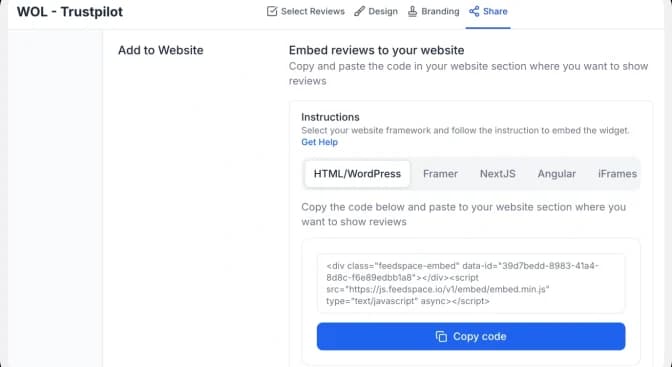
Step 2: Paste the code into your website
Open the page where you want the reviews to appear and add an HTML, embed or custom-code block. Paste the complete Feedspace code into the block, preview the page, and publish it when the layout looks correct on desktop and mobile.
| Important: Paste the complete snippet exactly as copied. If your website builder strips scripts, use the iFrame option or follow that platform’s custom-code instructions. |
Step 3: Preview the finished Wall of Love
Confirm that the review cards, profile details, links and CTA display correctly. Check both desktop and mobile layouts before making the page live.

Note: Feedspace’s Wall of Love is fully customizable, you can change the description, branding colours, light/dark them and more.
Why Embed Trustpilot Reviews on Your Website?
1. Highly Customizable
Unlike most other tools that let you build a Wall Of Love with their own colors and designs, Feedspace allows you to choose your design choices and make it your own. Choose from layouts like grid, masonry, or carousel. Browse Wall of Love widget examples to pick the style that best fits your brand
2. File Upload Imports
Have imports that you’ve taken offline? Want to bring them into Feedspace? Just put them in a CSV file and upload it to your account! But make sure you follow the template provided by us.
3. Regular Updates & Notifications
With Feedspace, you can even get weekly reports and summaries of all the Trustpilot reviews collected, and interactions people have had with your forms. Sent directly to your email inbox.
Conclusion
Don’t let your Trustpilot reviews gather dust anymore. Display them like shiny new trophies instead. From importing to collecting to building a Wall Of Love, Feedspace is super simple to use and offers 24/7 support. Sign up for free today! Want to pull reviews from other platforms too? Feedspace also lets you import reviews from 31+ sources, including Google, TripAdvisor, and AppSumo.
FAQs
1. Can I use Trustpilot reviews on my website?
Yes. You can display your genuine Trustpilot reviews on your own website, and Feedspace makes it compliant and simple by importing them and letting you embed them through a Wall of Love. Always show reviews as they were written, without editing their meaning.
2. Is it free to embed Trustpilot reviews with Feedspace?
You can start for free, create a Feedspace account, import your Trustpilot reviews, and embed a Wall of Love at no cost. How many reviews you can display, and the advanced customization available, depend on your plan.
3. What happens if a review is removed from Trustpilot?
Once you import a Trustpilot review into Feedspace, a secure copy stays saved in your account. So even if the original is later removed from Trustpilot, your imported version remains available to display on your website.
4. Do embedded Trustpilot reviews help SEO?
Embedded reviews add fresh, authentic, user-generated content to your pages and can improve trust signals and on-page engagement, both of which support SEO. Use Feedspace’s embed so content renders for visitors and search engines alike.
5. How many Trustpilot reviews can I embed?
There’s no hard cap on the reviews you can import. The number you can actively display on your Wall of Love depends on your Feedspace plan, and you have full control over which reviews appear.