Introduction
Before trying a business, most people check its reviews. They want to know if other customers had a good experience before making a decision.
Many businesses collect reviews on Facebook. These reviews help build trust because they come from real customers. While people can read them on your Facebook page, many visitors first visit your website before contacting you or making a purchase.
Showing your Facebook reviews on your website helps visitors see real customer feedback without leaving your site.
With Feedspace, you can import your Facebook reviews, organize them in one place, and display them using a beautiful Wall of Love. In this guide, we’ll show you exactly how to do it.
Use Feedspace to Embed Facebook Reviews on Your Website
Feedspace is an AI-powered testimonial and review management platform that helps you collect, import, manage, and showcase reviews, testimonials, and videos.
Instead of manually copying Facebook reviews one by one, you can import them into Feedspace in just a few clicks. Once they’re imported, you can organize them into a Wall of Love and embed that wall anywhere on your website.
With Feedspace, you can:
- Import Facebook reviews in minutes.
- Keep all your reviews in one dashboard.
- Create a beautiful Wall of Love.
- Customize the design to match your brand.
- Embed the wall on any page of your website.
- Update your reviews anytime.
Everything is simple, fast, and beginner-friendly.
How to Import Facebook Reviews
Follow these simple steps to import your Facebook reviews into Feedspace.
Step 1: Open Your Facebook Business Page
Go to Facebook and open the business page whose reviews you want to display on your website.
Make sure you’re opening the correct Facebook page.
Step 2: Copy Your Facebook Page URL
Copy your Facebook page URL.
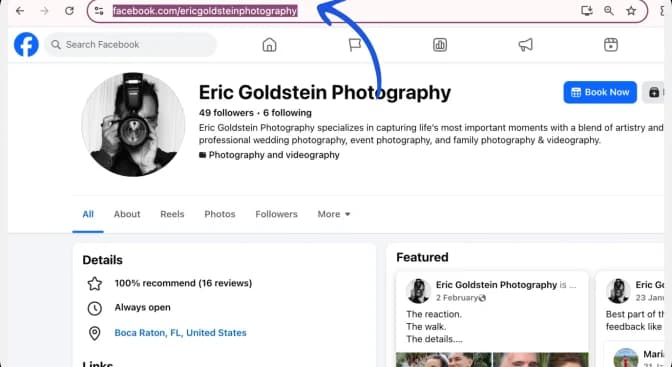
This is the link Feedspace will use to import your reviews.
Step 3: Log In to Feedspace
Now open your Feedspace account.

From the dashboard, click Import.
Step 4: Import Your Reviews
On the left-side panel, click Import.
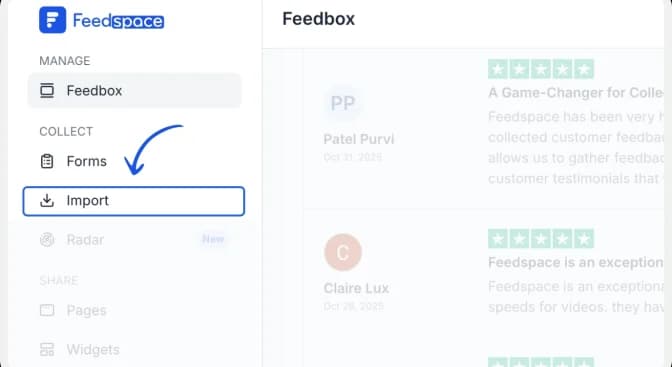
Paste your Facebook page URL into the input box.
Then click Fetch Reviews.
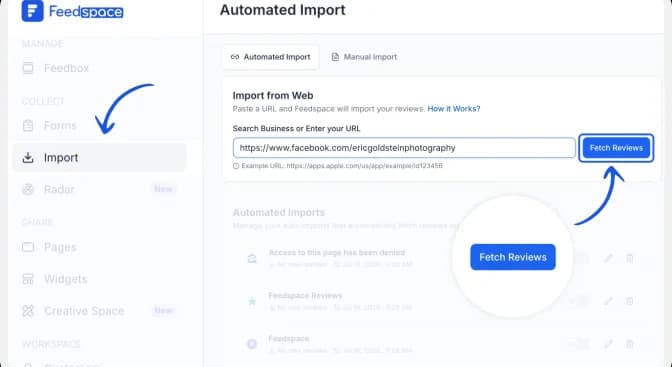
Feedspace will automatically fetch the reviews from your Facebook business page.
You can select all the reviews or choose only the ones you want to display.
After selecting the reviews, click Import Reviews.
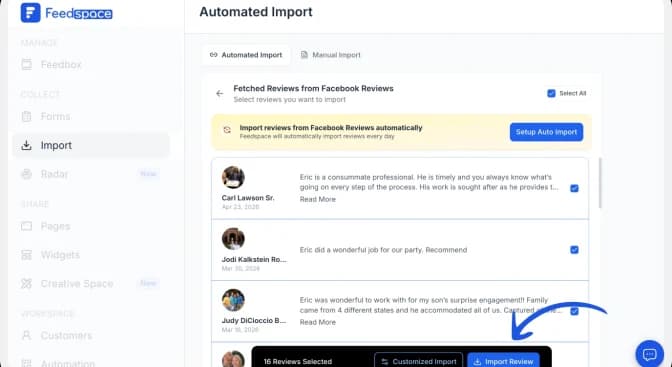
After clicking Import Reviews, you’ll see a snackbar message saying:
“Imported successfully.”
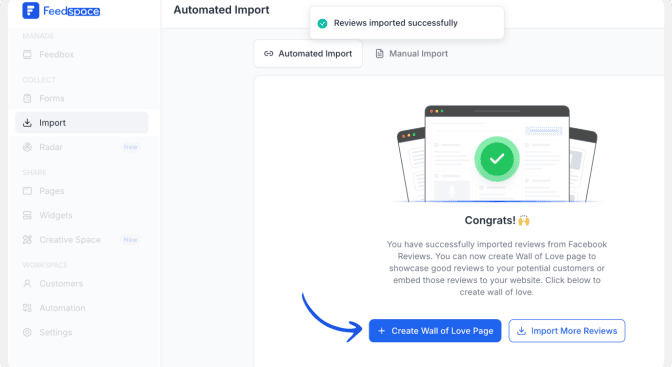
Step 5: Create a Wall of Love
Once your reviews have been imported, click + Wall of Love.
Then click Create Page.
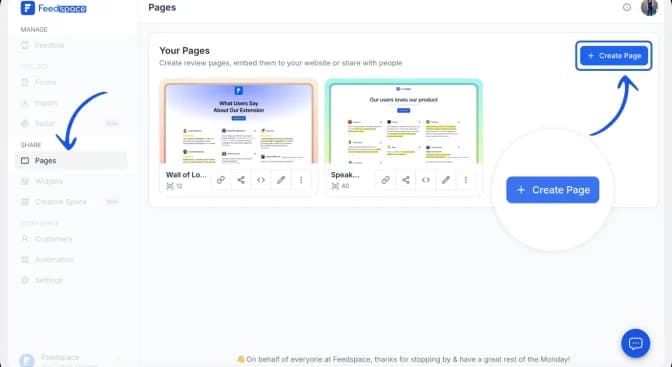
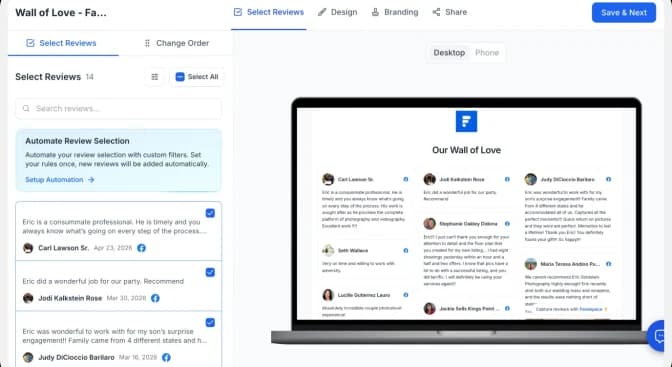
In a few seconds, you’ll see a preview of your Wall of Love.
Select the Facebook reviews you want to display from the left side of the preview page.
Once you’ve selected them, click Save and Next.
Step 6: Customize Your Wall
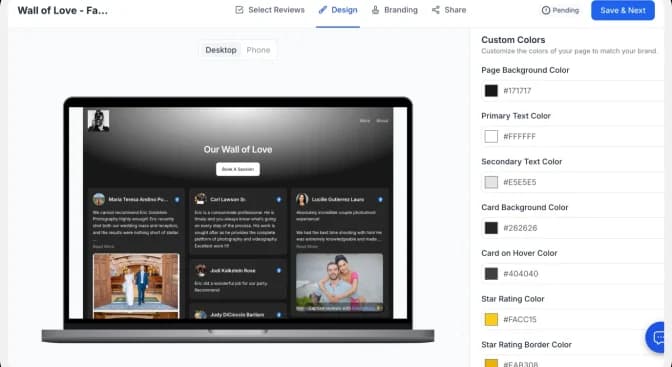
Now you can make the wall match your website.
Feedspace lets you:
- Change colors.
- Add your logo.
- Choose different layouts.
- Rearrange reviews.
- Add a title and description.
- Customize everything according to your brand before sharing it publicly.
How to Embed Facebook Reviews on Your Website
Before sharing, check your Wall of Love to make sure it looks the way you want.
Step 1: Click the Share Button
Click the Share button.
This will open different sharing options for your Wall of Love.
Step 2: Copy the Embed Code
From the Share menu, copy the embed code.
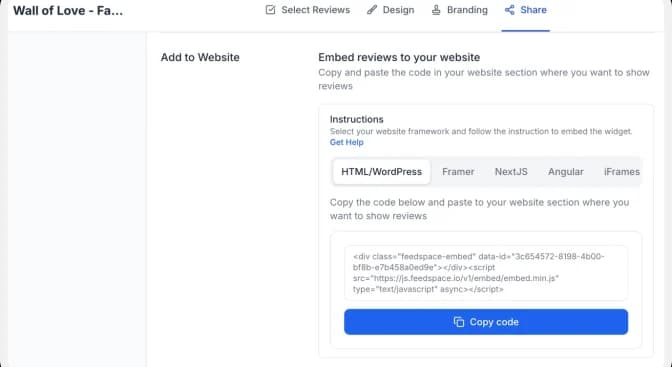
Paste the code into the section of your website where you want to display your Facebook reviews.
Save and publish your changes.
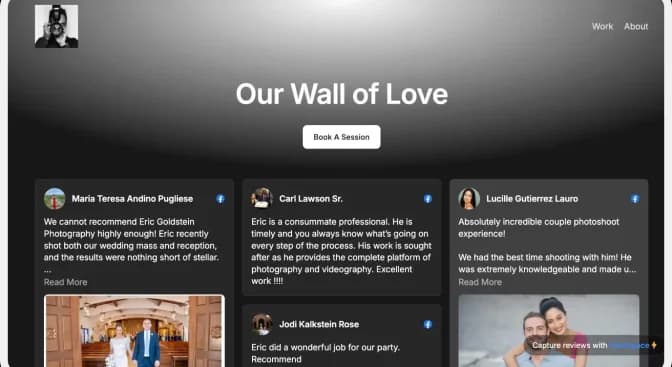
Your Facebook reviews will now appear beautifully on your website for visitors to see.
Benefits of Embedding Facebook Reviews on Your Website
Build Trust with New Visitors
People trust businesses that have real customer reviews. Showing Facebook reviews on your website helps visitors feel more confident before contacting you or making a purchase.
Keep Visitors on Your Website
Instead of asking visitors to leave your website and open Facebook, you can show your reviews directly on your site. This gives them all the information they need in one place.
Showcase Real Customer Experiences
Facebook reviews show honest feedback from your customers. They help new visitors understand the quality of your products or services.
Increase Conversions
When people see positive reviews from real customers, they’re more likely to trust your business and take the next step, whether that’s making a purchase, booking a service, or contacting your team.
Conclusion
Facebook reviews are one of the best ways to build trust with potential customers. Displaying them on your website helps visitors see real customer experiences before they decide to do business with you.
With Feedspace, you can import your Facebook reviews, organize them into a beautiful Wall of Love, customize the design to match your brand, and embed them anywhere on your website without any complicated setup.
In just a few simple steps, you can turn your Facebook reviews into a powerful trust-building section that makes your website more engaging and helps convert more visitors into customers.